Tips
When in a tabbed page
If storing the laptop long-term, remove the battery at a 30-40% charge.
Always power off the computer when it is not in use. Leaving the computer on when
the AC adaptor is not connected will exhaust the remaining battery capacity.
Consider replacing the battery every 2-3 years to ensure optimal performance.
Operating Temperature
Recharging will not commence if internal temperature of the battery pack is
outside of the allowable temperature range 0 °C to 50 °C {32 °F to 122 °F}.
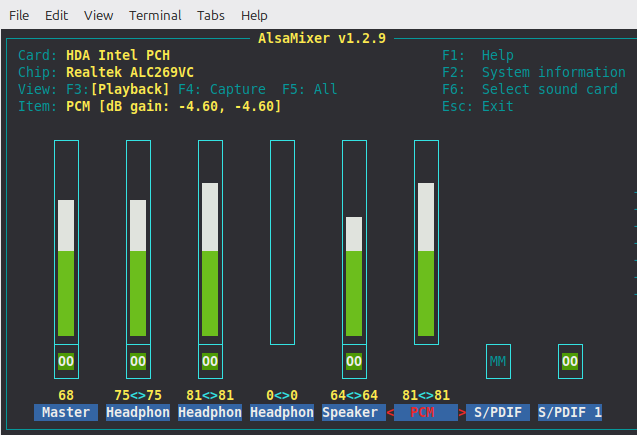
Enter:
F6 to select sound card
Select HDA Intel PCH
2nd column(Headphone) should NOT be MM
Click the base until MM changes to 00
Use arrow keys to adjust volume and 'M' to toggle mute.
- View all
- Ctrl->Alt->r
- For night reading in View All mode click the paintbrush icon and change the theme to Contrast. Ctrl->Alt->r to exit View All mode.
NumLock
To reset a locked or misbehaving number pad on a Panasonic Toughbook( a common Toughbook problem) in Linux, use the Fn + NumLk shortcut or install numlockx to force-enable the keypad. Depending on your specific Toughbook model (like the CF-19 or CF-31), the integrated numpad might be toggling letters instead of numbers, or turning off after reboots.Battery Maintenance
To maintain your Panasonic Toughbook battery, keep the charge between 40%-80% during regular use, avoid extreme temperatures.If storing the laptop long-term, remove the battery at a 30-40% charge.
Always power off the computer when it is not in use. Leaving the computer on when
the AC adaptor is not connected will exhaust the remaining battery capacity.
Consider replacing the battery every 2-3 years to ensure optimal performance.
Operating Temperature
Recharging will not commence if internal temperature of the battery pack is
outside of the allowable temperature range 0 °C to 50 °C {32 °F to 122 °F}.
Cleaning the Screen
Use a microfiber cloth slightly dampened with water or a 50/50 mix of water and isopropyl alcohol to gently clean the Toughbook screen. Avoid harsh chemicals or abrasive materials.No Sound
Open terminal (Ctrl->Alt->t)Enter:
alsamixer F6 to select sound card
Select HDA Intel PCH
2nd column(Headphone) should NOT be MM
Click the base until MM changes to 00
Use arrow keys to adjust volume and 'M' to toggle mute.
Chirp
Overview
chirp-next will not run on anything older than about ubuntu 22.04 (circa 2022) or so.
Install\Update sudo apt install python3-wxgtk4.0 pipxDownload Latest .whl | ChirpMyRadio
cd ~/Downloadspipx install --system-site-packages ./chirp-yyyymmdd-py3-none-any.whlRun by: ~/.local/bin/chirpThe first time CHIRP is launched it should pop up a prompt to add a .desktop file for the current user. Select yes if you want to have the icon installed into the application menu (the activities menu in gnome) to launch CHIRP. |
PrereqsDependancies
sudo apt update
|
Direwolf
Note: Close any programs using sound. Direwolf will not launch if any other audio is playing.
Cannot get card errorThe "cannot get card index" error in Linux means Direwolf cannot find or access your specified ALSA audio device. This usually happens when the device is mapped incorrectly, the index numbers have shifted after a reboot, or your user account lacks audio permissions. |
Fix
|
|
|
|
Failed to execute xterm -e direwolfLinux Mint 22 ("Wilma") dropped xterm from its default base installation in favor of the much more feature-rich GNOME Terminal (or Tilix, depending on your chosen desktop edition). |
Fix
sudo apt update
|
WebHTrack
WebHTTrack often fails to launch on Linux due to conflicts with default browsers (specifically Chrome
or Chromium) or missing dependencies.
Open a terminal and edit the script:
Find the line BROWSEREXE= and change it to:
Then, find the line starting with SRCHBROWSEREXE= and comment it out by adding a # at the start:
Save and exit.
If this does not resolve the issue on Ubuntu 18.04 or newer, you may need to install the HTTraQT GUI interface via sudo apt-get install httraqt.
Alternatively, you can try launching the server manually using /usr/lib/httrack/htsserver /usr/share/httrack and accessing the interface at http://localhost:8080 in your browser.
Open a terminal and edit the script:
sudo nano /usr/bin/webhttrack
Find the line BROWSEREXE= and change it to:
BROWSEREXE="firefox"
Then, find the line starting with SRCHBROWSEREXE= and comment it out by adding a # at the start:
#SRCHBROWSEREXE="x-www-browser www-browser iceape mozilla firefox ..."
Save and exit.
If this does not resolve the issue on Ubuntu 18.04 or newer, you may need to install the HTTraQT GUI interface via sudo apt-get install httraqt.
Alternatively, you can try launching the server manually using /usr/lib/httrack/htsserver /usr/share/httrack and accessing the interface at http://localhost:8080 in your browser.